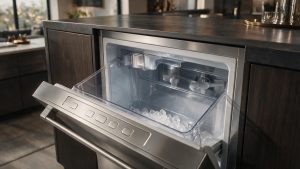
A red CLEAN light means the icemaker has to be cleaned now. The manual's nine steps are here.
Model compatibility: Monogram reuses codes across series and model years, so CLEAN light red may mean something different on another appliance or generation. Confirm this against your model’s documentation and record your full model number before acting.
Plain language
What this code means
A red CLEAN light means the icemaker must be cleaned, otherwise ice production decreases significantly or stops altogether.
A red CLEAN light is the icemaker telling you the cleaning can no longer wait. The owner’s manual says it must be cleaned, otherwise ice production will decrease significantly or stop altogether.
Where red comes after yellow
The light first turns yellow when the control senses that cleaning is approaching, and it eventually turns red. The technical service guide calls the colors green, amber and red, and gives the points where it changes: amber after 50 hung slabs or 3500 freeze cycles, red after 70 hung slabs or 4000 freeze cycles. With the light red and steady, the unit has to be cleaned to turn it off.
The clean cycle from the owner’s manual
Press and hold OFF for 3 seconds.
Wait 5 to 10 minutes for the ice to fall into the bin, then take all the ice out.
Unscrew the drain cap at the bottom of the water reservoir (inside the storage bin) and let the water drain completely.
Put the drain cap back.
Pour in one 16 oz. bottle of the ice machine cleaner the manual specifies, following the safety precautions on the bottle, then fill the bottle twice with tap water and pour that into the reservoir as well.
Press and hold CLEAN for 3 seconds. The CLEAN light blinks while the cycle runs, for about 70 minutes.
When the light turns solid and stays lit, the cycle is finished. The system cleans and rinses itself.
Take the drain cap off again. If green cleaning solution still drains out, run the cycle once more with only tap water in the reservoir, with the cap tightened first, because a loose cap can leak and cause thin ice or no ice.
Press the ON button for 3 seconds to resume ice production.
Which icemakers
The Monogram ZDIC150 and ZDIS150, an older (legacy) series.
If the cycle has run and the light stays red, call (844) 415-4997 for Monogram ice maker service in Los Angeles. Give us the model number and say that you ran the clean cycle. The ice maker repair page has details.
Important safety warning. Do not attempt repairs involving electrical components, gas, water lines, refrigerant or sealed systems. Unplug the appliance if it is safe to reach the outlet, and leave internal diagnostics to a qualified technician.
Seeing this code on your Monogram appliance?
Book a specialist visit for a clear estimate and approval before any repair.
Dedicated ice machines combine plumbing, freezing, circulation, harvesting, and drainage in one compact appliance. “Not making ice” can begin with water supply,…